第6章 第3节 一次完整的调用流程
第6章 第3节 一次完整的调用流程
Tip
阅读指南
上一节理清了 Function Calling 的角色分工。现在深入实际运行机制——从头到尾走一遍 LLM 怎么判断、怎么调用、怎么把工具结果整合成最终回答。
3.1 一次完整的调用流程
完整流程示例
用一个具体例子走一遍全程。假设用户问"明天成都会下雪吗?"。
工具定义
# 你定义可用的工具
tools = [
    {
        "type": "function",
        "function": {
            "name": "get_weather",
            "description": "获取指定城市和日期的天气信息,支持查询温度、天气状况、降水等",
            "parameters": {
                "type": "object",
                "properties": {
                    "city": {
                        "type": "string",
                        "description": "城市名称,如:成都、上海、深圳"
                    },
                    "date": {
                        "type": "string",
                        "description": "日期,支持格式:今天、明天、后天、2026-01-20"
                    }
                },
                "required": ["city", "date"]
            }
        }
    }
]
参数解析:
name:函数名称,LLM会看到这个名字description:功能描述,非常重要,LLM主要靠这个判断该用哪个工具函数parameters:参数定义,遵循 JSON Schema 规范
首次调用LLM
# 构造请求
messages = [
    {"role": "user", "content": "明天成都会下雪吗?"}
]

# 调用LLM(提供工具列表)
response = client.chat.completions.create(
    model="qwen3.6-plus",
    messages=messages,
    tools=tools  # ← 关键:tools参数是激活Function Calling的开关
)

# LLM的内部思考过程(简化)
# 1. 分析用户意图:查询天气
# 2. 检查工具列表:有get_weather可用
# 3. 判断:需要调用工具
# 4. 提取参数:city="成都", date="明天"
LLM 返回的结构如下:
# response的结构
{
    "id": "chatcmpl-xxx",
    "choices": [{
        "message": {
            "role": "assistant",
            "content": null,  # ← 没有文本回答
            "tool_calls": [   # ← 有工具调用
                {
                    "id": "call_abc123",
                    "type": "function",
                    "function": {
                        "name": "get_weather",
                        "arguments": '{"city": "成都", "date": "明天"}'
                    }
                }
            ]
        },
        "finish_reason": "tool_calls"  # ← 表示需要调用工具
    }]
}
其中 content 为 null 说明 LLM 没有直接回答,而是要求调用工具;tool_calls 包含要调用的工具信息;arguments 是 JSON 字符串,需要解析。
执行函数
import json

# 从LLM的回复提取工具调用信息
tool_call = response.choices[0].message.tool_calls[0]
function_name = tool_call.function.name  # "get_weather"
arguments = json.loads(tool_call.function.arguments)  # {"city": "成都", "date": "明天"}

# 实际执行函数
def get_weather(city, date):
    """
    这里是你的实现
    可以调用真实的天气API
    """
    # 示例:调用天气API
    api_result = weather_api.query(
        city=city,
        date=date
    )
    return {
        "city": city,
        "date": "2026-01-16",
        "weather": "多云",
        "temperature": "-5℃ ~ 3℃",
        "precipitation": "降雪概率:80%",
        "tips": "明天可能有小雪,注意保暖"
    }

# 执行调用
function_result = get_weather(**arguments)

# function_result = {
#     "city": "成都",
#     "date": "2026-01-16",
#     "weather": "多云",
#     "temperature": "-5℃ ~ 3℃",
#     "precipitation": "降雪概率:80%",
#     "tips": "明天可能有小雪,注意保暖"
# }
二次调用LLM
# 把函数结果添加到对话历史
messages.append(response.choices[0].message)  # LLM的工具调用消息
messages.append({
    "role": "tool",  # ← 表示这是工具返回的结果,不是LLM的回答
    "tool_call_id": tool_call.id,
    "content": json.dumps(function_result)
})

# 现在messages的结构:
# [
#     {"role": "user", "content": "明天成都会下雪吗?"},
#     {"role": "assistant", "tool_calls": [...]},  # LLM说要调用工具
#     {"role": "tool", "content": "{...}"}  # 工具返回的结果
# ]

# 再次调用LLM,让它整合结果生成回答
final_response = client.chat.completions.create(
    model="qwen3-max",
    messages=messages  # LLM会看到工具的返回结果
)

# LLM基于函数结果生成回答
print(final_response.choices[0].message.content)
# "明天成都可能会下雪,降雪概率达到80%。
#  气温在-5℃到3℃之间,天气多云转雪。
#  建议您出行时注意保暖,穿上厚外套,带好围巾手套。"
完整流程图
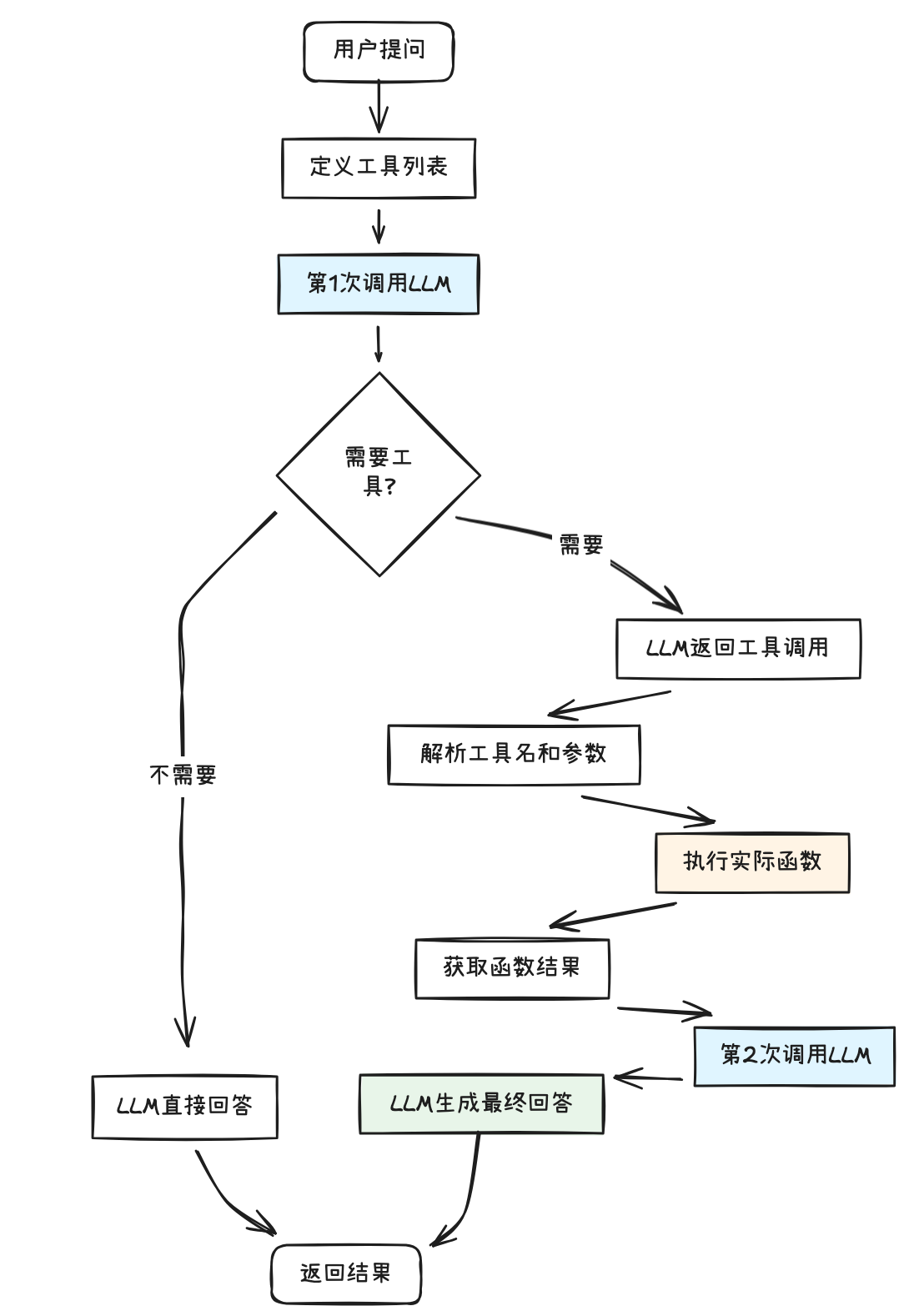
3.2 工具描述是成败关键
工具描述的重要性
LLM主要靠description来判断该不该用这个工具。
写得好和写得差的区别很大,对比一下:
# Bad: 描述不清晰
{
    "name": "query",
    "description": "查询",  # 太笼统,LLM不知道能查什么
    "parameters": {...}
}

# Good:描述清晰
{
    "name": "query_weather",
    "description": "查询指定城市和日期的天气信息,包括温度、天气状况、风力、降水等。支持查询最近7天的天气预报。",
    "parameters": {...}
}
好的描述有几个要点:
- 说明工具的具体功能
- 说明工具的适用场景
- 说明工具的限制(如时间范围)
- 给出示例用法(可选)
单选题#302
在 Function Calling 的工具定义中,description 字段的作用被强调为"非常重要"。这是因为 description 最直接影响了 LLM 的哪个决策环节? (复习题)
决定该调用哪个工具,因为 LLM 主要靠描述来匹配用户意图和工具功能
决定工具执行后的结果格式是 JSON 还是 XML
参数设计
遵循JSON Schema规范
{
    "type": "object",
    "properties": {
        "city": {
            "type": "string",
            "description": "城市名称",
            "enum": ["成都", "上海", "深圳"]  # 可选:限定可选值
        },
        "date": {
            "type": "string",
            "description": "日期,格式:YYYY-MM-DD或今天/明天/后天"
        },
        "units": {
            "type": "string",
            "description": "温度单位",
            "enum": ["celsius", "fahrenheit"],
            "default": "celsius"  # 默认值
        }
    },
    "required": ["city", "date"]  # 必填参数
}
错误处理
LLM可能会犯错:
选错工具
用户:"帮我发邮件"
LLM误选:get_weather(错误)

解决:完善工具描述,明确适用场景
参数提取错误
# 用户:"查查魔都明天天气"
# LLM提取:city="魔都"(错误,应该是"上海")

# 解决:在description中说明城市名称格式
{
    "city": {
        "type": "string",
        "description": "城市标准名称,如:成都、上海(不要用别称)"
    }
}
缺失必填参数
# 用户:"明天天气"(没说城市)
# LLM可能无法提取city参数

# 解决1:让LLM反问用户
if 参数缺失:
    return "请问您要查询哪个城市的天气?"

# 解决2:设置默认值
{
    "city": {
        "type": "string",
        "description": "城市名称,默认成都",
        "default": "成都"
    }
}
多轮工具调用
有些任务需要调用多次工具:
"帮我查明天成都天气,如果会下雨就提醒我带伞"
# 流程:
1. 第1次LLM调用 → 决定调用get_weather
2. 执行get_weather → 获取天气数据
3. 第2次LLM调用 → 判断是否下雨
4. 如果下雨 → 决定调用set_reminder
5. 执行set_reminder → 设置提醒
6. 第3次LLM调用 → 生成最终回答
3.3 ■ 学点英语
| 中文 | English | 音标 | 说明 |
|---|---|---|---|
| 工具调用字段 | tool_calls | /tuːl kɔːlz/ | LLM返回的结构化字段,指示代码需要执行哪些工具函数 |
| 完成原因 | finish_reason | /ˈfɪnɪʃ rɪˈziːzən/ | LLM响应中的标志位,tool_calls表示需要调用工具而非直接回答 |
| JSON模式 | JSON Schema | /ˈdʒeɪsɒn ˈskiːmə/ | 定义工具参数结构的规范,包括类型、必填、枚举等约束 |
| 多轮工具调用 | Multi-turn Tool Calling | /ˈmʌlti tɜːn tuːl ˈkɔːlɪŋ/ | 依赖上一步结果逐步执行多次工具调用的流程模式 |
3.4 ■ 思考帧
单选题#303
在一次完整的 Function Calling 调用中,当 LLM 返回 finish_reason: "tool_calls" 时,这意味着什么? (复习题)
LLM 没有直接回答用户,而是要求调用工具,代码需要继续处理 tool_calls
多选题#304
关于工具描述(description 字段)的编写,以下哪些是推荐的要点? (复习题)
在 description 中明确工具的限制,如时间范围
description 越短越好,因为 LLM 的上下文窗口有限
单选题#305
In Function Calling, the description field in a tool definition is considered the most critical factor for LLM accuracy. Which of the following best explains why? (复习题)
The description field determines the return format of the function's output.
The LLM primarily relies on the description field to semantically match the user's intent with the appropriate tool.
The description field acts as executable code that the LLM runs directly.
The description field is only used for logging purposes and does not affect LLM behavior.
什么是"多轮工具调用"?请简述一次"查天气→决定是否设置提醒"的场景中,LLM API 调用和工具函数执行分别发生了多少次,以及为什么不能一次规划完所有操作。 (复习题)
本题无需提交、无对错判定;需要时可点击「查看答案」展开参考答案;若有解析会一并展示。
你正在为一家连锁餐厅设计一个 AI 客服系统。该系统的需求包括:① 根据用户的位置和时间推荐附近门店;② 查询门店当日菜单和优惠活动;③ 预订座位;④ 如果预订成功,自动设置为门店的提醒。已知读者已掌握 Function Calling 工具定义、JSON Schema 参数设计、多轮工具调用流程、错误处理,以及 RAG、Prompt Engineering、CoT、Temperature/Top-p 等概念。请设计这套系统的工具集方案,重点说明工具拆分策略、description 的设计要点,以及多轮调用流程的关键环节。 (设计题)
本题无需提交、无对错判定;需要时可点击「查看答案」展开参考答案;若有解析会一并展示。